Anda para mahasiswa sering kali membayangkan bahwa setiap liburan panjang diakhir semester akan sangat menghibur anda dari kepenatan kegiatan kuliah?pastinya, setiap mahasiswa ingin membayangkan itu semua, termaksud dengan saya yang sebenarnya sudah 1 minggu ini masuk dalam kalender libur selama 2 bulan (sesuai dengan kalender akademik). Berhubung dengan ketidak adanya fasilitas SP(semester pendek) dalam program kampus saya, sudah sepatutnya saya bisa menikmati liburan dengan santainya.
Banyaknya pekerjaan yang saya miliki disamping perkuliahan saya membuat liburan yang diberikan oleh kamous saya selama 2 bulan itu seolah-olah merupakan waktu yang sangat efektif untuk saya memperbaiki kinerja saya dalam karir saya sebagai pegawai kantoran dan juga anggota himpunan kampus saya. mungkin ada sedikit rasa kecewa dalam diri saya mengapa semester ini terlalu padat jadwal pekerjaan saya yang mengakibatkan mengganggu jadwal liburan saya, akan tetapi saya menemukan satu hal yang mengarahkan saya selalu untuk berfikir panjang untuk karir dan tanggung jawab saya akan segala sesuatu yang sudah Tuhan berikan kepada saya. Saya sendiri kembali menyambut segala pekerjaan saya dan tanggung jawab saya diluar perkuliahan saya dengan merasa bersyukur sekali saya bisa mengerjakan segala pekerjaan saya dengan senyum bangga terhadap diri saya sendiri. Mungkin ini yang namanya nikmat bekerja dengan cara menghadapi segala sesuatu dengan hati yang ceria, pikiran yang tenang dan raut wajah yang selalu ingin tersenyum.
melihat pribadi orang memang seharusnya tidak seharusnya dibahas dalam situs umum seperti ini. Tapi saya akan berusaha untuk tidak menampilkan pribadi ini karna yang saya mau tangkap adalah kepribadiannya dan juga bukan maksud untuk memprotesi tapi,justru saya mencoba belajar akan hal ini. semua orang punya kepekaan terhadap sesuatu dalam dirinya walaupun itu terhitung kecil sekalipun.
saya seringkali melihat sikap orang yang cenderung ingin diperhatikan dan dikasihani. menurut saya hal ini tidak terlalu penting untuk pribadi seseorang untuk dijadikan sebuah permasalahan. bahkan seharusnya itu menjadi acuan hidup seseorang untuk bersikap dewasa untuk menahan emosi diri.
saya seringkali melihat sikap orang yang cenderung ingin diperhatikan dan dikasihani. menurut saya hal ini tidak terlalu penting untuk pribadi seseorang untuk dijadikan sebuah permasalahan. bahkan seharusnya itu menjadi acuan hidup seseorang untuk bersikap dewasa untuk menahan emosi diri.
Mengenal cloud computing

Internet dengan segala pilihan kecepatannya telah menghantarkan kita pada era baru dengan segundang pemanfaatan teknologi internet. Komunikasi yang cukup cepat melahirkan satu teknologi penyimpanan digital, dimana hardware tidak lagi menjadi aset investasi penyimpanan data, transformasi ini disebut juga dengan Cloud Computing. berikut ini perngertian cloud computing dari beberapa sumber.
Komputasi awan (bahasa Inggris: cloud computing) adalah gabungan pemanfaatan teknologi komputer ('komputasi') dan pengembangan berbasis Internet ('awan'). Awan (cloud) adalah metefora dari internet, sebagaimana awan yang sering digambarkan di diagram jaringan komputer. Sebagaimana awan dalam diagram jaringan komputer tersebut, awan (cloud) dalam Cloud Computing juga merupakan abstraksi dari infrastruktur kompleks yang disembunyikannya.[1] Ia adalah suatu metoda komputasi di mana kapabilitas terkait teknologi informasi disajikan sebagai suatu layanan (as a service), [2] sehingga pengguna dapat mengaksesnya lewat Internet ("di dalam awan") [3] tanpa mengetahui apa yang ada didalamnya, ahli dengannya, atau memiliki kendali terhadap infrastruktur teknologi yang membantunya.[4] Menurut sebuah makalah tahun 2008 yang dipublikasi IEEE Internet Computing "Cloud Computing adalah suatu paradigma di mana informasi secara permanen tersimpan di server di internet dan tersimpan secara sementara di komputer pengguna (client) termasuk di dalamnya adalah desktop, komputer tablet, notebook, komputer tembok, handheld, sensor-sensor, monitor dan lain-lain."[5]
Komputasi awan adalah suatu konsep umum yang mencakup SaaS, Web 2.0, dan tren teknologi terbaru lain yang dikenal luas, dengan tema umum berupa ketergantungan terhadap Internet untuk memberikan kebutuhan komputasi pengguna. Sebagai contoh, Google Apps menyediakan aplikasi bisnis umum secara daring yang diakses melalui suatu penjelajah web dengan perangkat lunak dan data yang tersimpan di server.
Sumber: wiki
History has a funny way of repeating itself, or so they say. But it may come as some surprise to find this old cliché applies just as much to the history of computers as to wars, revolutions, and kings and queens. For the last three decades, one trend in computing has been loud and clear: big, centralized, mainframe systems have been "out"; personalized, power-to-the-people, do-it-yourself PCs have been "in." Before personal computers took off in the early 1980s, if your company needed sales or payroll figures calculating in a hurry, you'd most likely have bought in specialized "data-processing" services from another company, with its own expensive computer systems, that specialized in number crunching; these days, you can do the job just as easily on your desktop with off-the-shelf software. Or can you? In a striking throwback to the 1970s, many companies are finding, once again, that buying in computer services makes more business sense than do-it-yourself. This new trend is called cloud computing and, not surprisingly, it's linked to the Internet's inexorable rise. What is cloud computing? How does it work? Let's take a closer look! Photo: Cloud computing: the hardware, software, and applications you're using may be anywhere up in the "cloud." As long as it all does what you want, you don't need to worry where it is or how it works. Composite photo by Explainthatstuff.com based on a picture of an IBM Blue Gene/P supercomputer, by courtesy of Argonne National Laboratory, published under a Creative Commons Licence, and clouds photographed somewhere over Dorset, England, in 2011.
What is cloud computing?
Cloud computing means that instead of all the computer hardware and software you're using sitting on your desktop, or somewhere inside your company's network, it's provided for you as a service by another company and accessed over the Internet, usually in a completely seamless way. Exactly where the hardware and software is located and how it all works doesn't matter to you, the user—it's just somewhere up in the nebulous "cloud" that the Internet represents.
Cloud computing is a buzzword that means different things to different people. For some, it's just another way of describing IT (information technology) "outsourcing"; others use it to mean any computing service provided over the Internet or a similar network; and some define it as any bought-in computer service you use that sits outside your firewall. However we define cloud computing, there's no doubt it makes most sense when we stop talking about abstract definitions and look at some simple, real examples—so let's do just that.
Simple examples of cloud computing
Most of us use cloud computing all day long without realizing it. When you sit at your PC and type a query into Google, the computer on your desk isn't playing much part in finding the answers you need: it's no more than a messenger. The words you type are swiftly shuttled over the Net to one of Google's hundreds of thousands of clustered PCs, which dig out your results and send them promptly back to you. When you do a Google search, the real work in finding your answers might be done by a computer sitting in California, Dublin, Tokyo, or Beijing; you don't know—and most likely you don't care!
The same applies to Web-based email. Once upon a time, email was something you could only send and receive using a program running on your PC (sometimes called a mail client). But then Web-based services such as Hotmail came along and carried email off into the cloud. Now we're all used to the idea that emails can be stored and processed through a server in some remote part of the world, easily accessible from a Web browser, wherever we happen to be. Pushing email off into the cloud makes it supremely convenient for busy people, constantly on the move.
Preparing documents over the Net is a newer example of cloud computing. Simply log on to a web-based service such as Google Documents and you can create a document, spreadsheet, presentation, or whatever you like using Web-based software. Instead of typing your words into a program like Microsoft Word or OpenOffice, running on your computer, you're using similar software running on a PC at one of Google's world-wide data centers. Like an email drafted on Hotmail, the document you produce is stored remotely, on a Web server, so you can access it from any Internet-connected computer, anywhere in the world, any time you like. Using a Web-based service like this means you're "contracting out" or "outsourcing" some of your computing needs to a company such as Google: they pay the cost of developing the software and keeping it up-to-date and they earn back the money to do this through advertising and other paid-for services.
What makes cloud computing different?
It's managed
Most importantly, the service you use is provided by someone else and managed on your behalf. If you're using Google Documents, you don't have to worry about buying umpteen licenses for word-processing software or keeping them up-to-date. Nor do you have to worry about viruses that might affect your computer or about backing up the files you create. Google does all that for you. One basic principle of cloud computing is that you no longer need to worry how the service you're buying is provided: with Web-based services, you simply concentrate on whatever your job is and leave the problem of providing dependable computing to someone else.It's "on-demand"
Cloud services are available on-demand and often bought on a "pay-as-you go" or subscription basis. So you typically buy cloud computing the same way you'd buy electricity, telephone services, or Internet access from a utility company. Sometimes cloud computing is free or paid-for in other ways (Hotmail is subsidized by advertising, for example). Just like electricity, you can buy as much or as little of a cloud computing service as you need from one day to the next. That's great if your needs vary unpredictably: it means you don't have to buy your own gigantic computer system and risk have it sitting there doing nothing.It's public or private
Now we all have PCs on our desks, we're used to having complete control over our computer systems—and complete responsibility for them as well. Cloud computing changes all that. It comes in two basic flavors, public and private, which are the cloud equivalents of the Internet and Intranets. Web-based email and free services like the ones Google provides are the most familiar examples of public clouds. The world's biggest online retailer, Amazon, became the world's largest provider of public cloud computing in early 2006. When it found it was using only a fraction of its huge, global, computing power, it started renting out its spare capacity over the Net through a new entity called Amazon Web Services. Private cloud computing works in much the same way but you access the resources you use through secure network connections, much like an Intranet. Companies such as Amazon also let you use their publicly accessible cloud to make your own secure private cloud, known as a Virtual Private Cloud (VPC), using virtual private network (VPN) connections.Types of cloud computing
IT people talk about three different kinds of cloud computing, where different services are being provided for you. Note that there's a certain amount of vagueness about how these things are defined and some overlap between them.- Infrastructure as a Service (IaaS) means you're buying access to raw computing hardware over the Net, such as servers or storage. Since you buy what you need and pay-as-you-go, this is often referred to as utility computing. Ordinary web hosting is a simple example of IaaS: you pay a monthly subscription or a per-megabyte/gigabyte fee to have a hosting company serve up files for your website from their servers.
- Software as a Service (SaaS) means you use a complete application running on someone else's system. Web-based email and Google Documents are perhaps the best-known examples. Zoho is another well-known SaaS provider offering a variety of office applications online.
- Platform as a Service (PaaS) means you develop applications using Web-based tools so they run on systems software and hardware provided by another company. So, for example, you might develop your own ecommerce website but have the whole thing, including the shopping cart, checkout, and payment mechanism running on a merchant's server. Force.com (from salesforce.com) and the Google App Engine are examples of PaaS.
Advantages and disadvantages of cloud computing
What's good and bad about cloud computing?Advantages
The pros of cloud computing are obvious and compelling. If your business is selling books or repairing shoes, why get involved in the nitty gritty of buying and maintaining a complex computer system? If you run an insurance office, do you really want your sales agents wasting time running anti-virus software, upgrading word-processors, or worrying about hard-drive crashes? Do you really want them cluttering your expensive computers with their personal emails, illegally shared MP3 files, and naughty YouTube videos—when you could leave that responsibility to someone else? Cloud computing allows you to buy in only the services you want, when you want them, cutting the upfront capital costs of computers and peripherals. You avoid equipment going out of date and other familiar IT problems like ensuring system security and reliability. You can add extra services (or take them away) at a moment's notice as your business needs change. It's really quick and easy to add new applications or services to your business without waiting weeks or months for the new computer (and its software) to arrive.Drawbacks
![Apple ][ microcomputer in a museum glass case](http://cdn3.explainthatstuff.com/appleII.jpg)
Instant convenience comes at a price. Instead of purchasing computers and software, cloud computing means you buy services, so one-off, upfront capital costs become ongoing operating costs instead. That might work out much more expensive in the long-term.
If you're using software as a service (for example, writing a report using an online word processor or sending emails through webmail), you need a reliable, high-speed, broadband Internet connection functioning the whole time you're working. That's something we take for granted in countries such as the United States, but it's much more of an issue in developing countries or rural areas where broadband is unavailable.
If you're buying in services, you can buy only what people are providing, so you may be restricted to off-the-peg solutions rather than ones that precisely meet your needs. Critics charge that cloud-computing is a return to the bad-old days of mainframes and proprietary systems, where businesses are locked into unsuitable, long-term arrangements with big, inflexible companies. Instead of using "generative" systems (ones that can be added to and extended in exciting ways the developers never envisaged), you're effectively using "dumb terminals" whose uses are severely limited by the supplier. Good for convenience and security, perhaps, but what will you lose in flexibility? And is such a restrained approach good for the future of the Internet as a whole? (To see why it may not be, take a look at Jonathan Zittrain's eloquent book The Future of the Internet—And How to Stop It.)
Think of cloud computing as renting a fully serviced flat instead of buying a home of your own. Clearly there are advantages in terms of convenience, but there are huge restrictions on how you can live and what you can alter. Will it automatically work out better and cheaper for you in the long term?
 Mahasiswa (maha dan siswa) intinya tetap disebut siswa, walaupun banyak anak sma atau smp yang sangat ingin mencapai suatu tahapan sebagai mahasiswa, bagaikan hal yang sangat diidam-idamkan semua siswa, bagaikan mendapatkan pencapaian fase kehidupan yang sangat membanggakan. akan tetapi saya tidak akan membahas bagaimana rasanya saya sudah mencapai suatu fase hidup yang satu ini, melainkan saya akan membahas bagaimana menanggulangi waktu luang yang dimiliki oleh mahasiswa (yang katanya banyak memiliki waktu luang).
Start dari awal saya menjadi mahasiswa di salah satu universitas swasta yang memiliki puluhan ribu tumpukkan nama dan npm dalam database mahasiswanya, saya mendapatkan satu hari libur dalam satu minggu hari aktif (senin-sabtu). lalu saya sangat ingin memanfaatkan satu hari emas ini setiap minggunya dengan mengisinya dengan beberapa kegiatan yang sedikit merugi untuk kantong (mungkin) akan tetapi sangat memiliki nilai positif. Woow...mungkin ini hal yang biasa untuk dibangun atau dipupuk oleh banyak mahasiswa, hal ini sangat menguntungkan jika kita sebagai mahasiswa atau kalian yang akan memasukki fase ini nantinya, kalian harus memiliki tekad untuk "melakukan hal positif untuk waktu luang". Berikut ini adalah kegiatan saya:
1. mengikuti les (piano, nyanyi, b.Inggris, dll)
2. nonton film (merefresh otak dari aktifitas perkuliahan atau lainnya)
3. bekerja part time (ini hal yang sedikit sulit didapat, akan tetapi terkadang mudah)
4. membedah rumah/kamar ( pekerjaan rumah yang sangat membuat kita selalu malas)
5. istirahat (untuk hal yang satu ini please...jangan lakukan ini dengan tidur yang overtime)
6. mengerjakan tugas
7. olah raga (nilai yang positif juga untuk tubuh kita)
8. browsing (mencari berita yang memungkinkan otak berkembang)
9. perawatan tubuh (hal yang sangat jarang saya lakukan karna terlalu sibuk)
Sembilan hal inilah yang sudah mengisi hari libur saya selama saya kuliah hingga sekarang masih dalam perkuliahan semester 4(empat). jangan menganggap hal ini muda dilakukan, apalagi godaan dalam kegiatan saya yang ada pada nomor 5 sangat sering membuat kita batal melakukan banyak hal positif yang ada disekitar kita.

Galaxy Tab 10.1 (samsung)
Ketika dipegang, detikINET terkesan dengan betapa tipis bodi komputer tablet ini. Ya, inilah rupanya salah satu kelebihan yang coba ditawarkan Galaxy Tab 10.1, bodinya diklaim tertipis di dunia.
Dengan tebal cuma 8,6 mm, rasanya memang tidak ada tablet lain yang mengalahkan ketipisannya. iPad 2 yang sebelumnya memiliki predikat tertipis pun kalah karena lebih tebal 0,2 mm dari Galaxy Tab 10.1.
Ketika ditenteng pun beratnya terbilang ringan. Samsung menyebut bobotnya cuma 595 gram. Bobot ini katanya lebih ringan dari Samsung Galaxy Tab versi layar 7 inch.
Bodinya sendiri masih terbuat dari plastik, namun terkesan elegan dan tidak murahan. Tablet ini terasa kokoh dan nyaman dipegang, meski tentunya tidak seportabel yang versi 7 inch.

Tidak banyak tombol di tubuh Galaxy Tab 10.1. Memang software Android Honeycomb tidak memakai lagi tombol navigasi di bodi gadget. Hanya dijumpai colokan headphone standar, port charging dan slot untuk SIM Card.
Mungkin perlu diinformasikan bahwa Galaxy Tab 10.1 ini tidak punya kemampuan untuk melakukan telepon seperti adiknya. Menurut Samsung, Google tidak mengizinkan Android Honeycomb disertai kemampuan itu.
Android Honeycomb
Sesuai namanya, Galaxy Tab 10.1 memiliki layar teknologi kapasitif seluas 10,1 inch WXGA dengan resolusi mencapai 1280x800. Ketika dilihat, layar ini cukup jernih dan nyaman di mata.
Android Honeycomb jadi sistem operasinya. Secara tampilan, tentu nyaris tak ada perbedaan dengan Honeycomb yang dipakai di tablet Android Honeycomb dari pabrikan lainnya. Namun Samsung berjanji bakal menambahkan interface TouchWiz andalannya yang belum ada pada unit demo.
Honeycomb sengaja didesain Google khusus untuk perangkat tablet dan dioptimalkan pada layar yang lebih luas, tidak seperti versi Android sebelumnya yang sejatinya ditujukan untuk smartphone. Tentu saja berbagai kelebihan disandang oleh si 'sarang madu' ini.
Navigasi di Honeycomb terbilang memudahkan pengguna. Misalnya fitur Recent Apps berguna untuk menampilkan beberapa aplikasi yang baru saja diakses oleh user.
Jika Recent Apps disentuh, akan muncul lima aplikasi yang terakhir dibuka, lengkap dengan nama dan thumbnail tampilan terakhirnya. Recent Apps tersedia di sudut bawah bersama tombol Home dan Back.
Honeycomb juga memperbaiki tampilan keyboard, browser dan kapabilitas copy paste lebih baik. Hanya saja mungkin kekurangannya pada soal aplikasi yang belum bergitu banyak tersedia. Mungkin karena usia OS ini yang boleh dibilang masih muda.
Galaxy Tab 10.1 mengandalkan prosesor dual core 1GHz Tegra 2 yang seharusnya membuat performa tablet lebih powerfull. Namun saat dicoba menggeser homescreen, ada sedikit kesan lag. Mungkin karena baru unit demo, maka performanya pun belum maksimal.
Fitur lainnya meliputi kamera belakang berkekuatan 3 megapixel dan kamera depan 2 megapixel. Asyiknya, kamera belakang sudah dilengkapi flash untuk menambah performa kamera jika dipakai dalam situasi gelap. Tablet ini juga mampu merekam video kualitas 720p HD.

Kapasitas penyimpanan terdiri dari dua pilihan yaitu 16GB dan 32GB. Secara keseluruhan, tablet ini tampil bergaya dengan ketipisannya dan bisa menjadi alternatif tablet Android Honeycomb yang mumpuni. Terlebih lagi bagi penggemar Galaxy Tab versi 7 inch mungkin bakal meliriknya karena Galaxy Tab 10.1 membawa segudang perbaikan fitur.
Spesifikasi kunci:
Jaringan: HSPA+ 21 Mbps, EDGE/GPRS
OS: Android 3.0 (Honeycomb)
Layar: 10,1 inch WXGA 1280x800
Prosesor: 1GHz Tegra 2 Dual Core
Kamera: 2MP (depan) dan 3MP (belakang) dengan LED Flash
Format video: MPEG4/H263/H264, Divx/Xvid
Solusi Bisnis: Microsoft Exchange ActiveSync, QuickOffice HD Editor
Konektivitas: Bluetooth 2.1, Wi Fi 802.11 (a/b/g/n)
Sensor: Gyroscope, Accelerometer, Digital Compass, Ambien Light
Baterai: 6800 mAh
Motivasi merupakan suatu dorongan yang terjadi atau didapati oleh sebuah keadaan,perilaku,ucapan,tindakan sehingga seseorang dapat terdorong untuk melakukan sesuatu tindakan ataupun keputusan dalam perihal sekecil, bahkan sebesar apapun. Kebanyakan kasus yang telah terjadi adalah manusia kini sangat mencari motivasi untuk dirinya sendiri, oleh karna hal ini seseorang sering kali mencenderungkan diri layaknya seseorang yang lemah, selalu berfikiran negatif terhadap dirinya dan dampak yang lebih keterlaluannya adalah tidak percaya diri.
Untuk menghilangkan dampak-dampak buruk yang tadi adalah "memotivasi diri sendiri " merupakan jawaban yang cukup bijak untuk kita yang merasa tidak ingin berlarut-larut merasa tidak percaya diri. Oleh sebab itu ada langkah-langkah yang harus anda ambil, yakni seperti di bawah ini:
Untuk menghilangkan dampak-dampak buruk yang tadi adalah "memotivasi diri sendiri " merupakan jawaban yang cukup bijak untuk kita yang merasa tidak ingin berlarut-larut merasa tidak percaya diri. Oleh sebab itu ada langkah-langkah yang harus anda ambil, yakni seperti di bawah ini:
- Becermin
untuk langkah pertama kita harus bercermin dengan diri kita sendiri. Siapakah anda? - Mencari
langkah kedua adalah mencari,apa yang kita cari dalam hidup kita?kekayaan'kah atau kenikmatan, atau bahkan keduanya. - Refleksikan
yang ketiga adalah tenangkan diri anda, bersantailah, jangan memikirkan apapun yang sangat membuat anda muak. - Tuliskan
ambil selembar kertas, dan tuliskan di kertas tersebut apa yang anda bisa dan anda ingin kembangkan, kira-kira apa yang bisa kamu buat untuk kedepannya. - BISA
Bisa karna anda harus bisa jadi diri anda sendiri. tak perlu memikirkan banyak omongan orang lain, dan fokuskan fikiran anda kepada diri anda. - DOA
Berdoalah agar anda siap untuk misi anda sendiri.
Demikian tips dari saya, semoga berguna.
Tokyo (CNN) -- Burdened by the weight of mounting national tragedies, residents in Japan painted a bleak picture Thursday of the still-unfolding crises but remained hopeful that they will pull through.
In the hardest-hit parts, thousands of citizens, most of them elderly, settled in into shelters -- indefinitely.
They found comfort in daily routine: lining up for lunch, folding and unfolding what few belongings they salvaged before walls of water devoured their communities.
In the capital, long lines of foreigners waited outside the immigration office for permits to temporarily leave Tokyo.
And at the quake-ravaged nuclear plant in Fukushima, air-drops of water did little to lower potentially perilous radiation levels.
Ayana Suzuki said she can't watch the news anymore. So she rented a stockpile of comedies to get her mind off the tragedy.


With each passing hour, the National Police Agency adds to the grim total: more than 5,000 dead and nearly 10,000 missing since Friday's 9.0-magnitude quake unleashed a tsunami on a nation already grappling with an unsteady economy.
"Food shortages in Tokyo are now becoming acute because of the panic," said Aaron Lace, a Canadian living in Tokyo who fled to Bangkok.
But for those left behind without homes, the elements conspired to rob them of hope as cold, snowy weather hampered rescue efforts.
In the town of Minamisanriku, mud, seaweed and fishing nets settled on the top floor of a three-story elementary school building.
Backpacks remained in cabinets, where 107 children left them when they ran for their lives.
Principal Atsushi Asokawa sifted through the muck and searched through school office desks.
"I'm looking for important files to ask for instructions from the government," he said.
"I will wait for the kids to come back."
The focus of the world is zeroed in on the Fukushima Daiichi plant.
Japanese forces made four helicopter passes in about a 20-minute span Thursday morning, dropping 7.5 tons of seawater each time on the facility's No. 3 reactor in order to cool its overheated fuel pool. Experts believe steam rising from that pool, which contains at least partially exposed fuel rods, may be releasing radiation into the atmosphere.
But hours later, the Tokyo Electric Power Co. -- which runs the plant -- told Japan's Kyodo News that the operation didn't appear to lower radiation levels
A Japanese government spokesman, Noriyuki Shikata, warded off fears of an imminent meltdown, telling CNN on Thursday, "We have not seen a major breach of containment" at any of the plant's troubled nuclear reactors.
A meltdown occurs when nuclear fuel rods cannot be cooled and the nuclear core melts. In the worst-case scenario, the fuel can spill out of the containment unit and spread radioactivity through the air and water.
That, public health officials say, can cause both immediate and long-term health problems, including radiation poisoning and cancer.


About 200,000 people living within a 20-kilometer (12-mile) radius of the plant have been evacuated; those living 20 to 30 kilometers from the site have been told to remain inside. Authorities also have banned flights over the area.
Several countries, including the United States, have called for a broader range. American troops, in the country to help with relief efforts, have been warned not to get within 80 kilometers (50 miles) of the plant.
Twenty-five kilometers from the plant, the town of Minamisoma was ghostly quiet, with empty streets and shuttered shops.
"People have not evacuated, they are staying at home," said Koichi Shiga, who owns a hotel there. "There was a ration of 10 liters of gas, and I saw a long line of people."
But the nuclear fears have spawned a mass exodus from the nation's capital.
The U.S. State Department said Thursday it will charter planes to evacuate about 600 family members of American diplomatic staff -- and arrange the departure of private citizens from affected areas.
Kosuke Deura, a 19-year-old Tokyo resident, said he would like to leave if the situation gets worse.
"But I am a student, and I don't have a lot of money," Deura said Thursday. "So I can't leave here."
Meanwhile, the constant threat of more earthquakes -- and hundreds of strong aftershocks -- do little to calm rattled nerves.
"I'm really concerned ... we still don't know exactly when the next big quake is going to happen," Kyohei Kiyota, who lives outside Tokyo, said Thursday. "It is really scary. To prepare for the next quake, we have to know about it."
And yet, hope persists.
Suzuki said she's optimistic more survivors will surface -- and that her fellow citizens will continue to handle the adversity with the steady demeanor that has impressed the world.
In the hardest-hit parts, thousands of citizens, most of them elderly, settled in into shelters -- indefinitely.
They found comfort in daily routine: lining up for lunch, folding and unfolding what few belongings they salvaged before walls of water devoured their communities.
In the capital, long lines of foreigners waited outside the immigration office for permits to temporarily leave Tokyo.
And at the quake-ravaged nuclear plant in Fukushima, air-drops of water did little to lower potentially perilous radiation levels.
Ayana Suzuki said she can't watch the news anymore. So she rented a stockpile of comedies to get her mind off the tragedy.

Spokesman defends Japanese goverment
Baby born in quake-devastated Japan
Race to save lives in Japan
Inside a Japan quake rescue effort
"Food and water (aren't) delivered to disaster areas," the 20-year-old Tokyo resident said, referring to the wiped-out infrastructure in Miyagi Prefecture. "I'm really upset not to help."With each passing hour, the National Police Agency adds to the grim total: more than 5,000 dead and nearly 10,000 missing since Friday's 9.0-magnitude quake unleashed a tsunami on a nation already grappling with an unsteady economy.
"Food shortages in Tokyo are now becoming acute because of the panic," said Aaron Lace, a Canadian living in Tokyo who fled to Bangkok.
But for those left behind without homes, the elements conspired to rob them of hope as cold, snowy weather hampered rescue efforts.
In the town of Minamisanriku, mud, seaweed and fishing nets settled on the top floor of a three-story elementary school building.
Backpacks remained in cabinets, where 107 children left them when they ran for their lives.
Principal Atsushi Asokawa sifted through the muck and searched through school office desks.
"I'm looking for important files to ask for instructions from the government," he said.
"I will wait for the kids to come back."
The focus of the world is zeroed in on the Fukushima Daiichi plant.
Japanese forces made four helicopter passes in about a 20-minute span Thursday morning, dropping 7.5 tons of seawater each time on the facility's No. 3 reactor in order to cool its overheated fuel pool. Experts believe steam rising from that pool, which contains at least partially exposed fuel rods, may be releasing radiation into the atmosphere.
But hours later, the Tokyo Electric Power Co. -- which runs the plant -- told Japan's Kyodo News that the operation didn't appear to lower radiation levels
A Japanese government spokesman, Noriyuki Shikata, warded off fears of an imminent meltdown, telling CNN on Thursday, "We have not seen a major breach of containment" at any of the plant's troubled nuclear reactors.
A meltdown occurs when nuclear fuel rods cannot be cooled and the nuclear core melts. In the worst-case scenario, the fuel can spill out of the containment unit and spread radioactivity through the air and water.
That, public health officials say, can cause both immediate and long-term health problems, including radiation poisoning and cancer.
Pills and suits for troops in nuke zone
An overview of a troubled nuke plant
Japanese try aerial assault on reactors
Containing the nuclear crisis in Japan
Several countries, including the United States, have called for a broader range. American troops, in the country to help with relief efforts, have been warned not to get within 80 kilometers (50 miles) of the plant.
Twenty-five kilometers from the plant, the town of Minamisoma was ghostly quiet, with empty streets and shuttered shops.
"People have not evacuated, they are staying at home," said Koichi Shiga, who owns a hotel there. "There was a ration of 10 liters of gas, and I saw a long line of people."
But the nuclear fears have spawned a mass exodus from the nation's capital.
The U.S. State Department said Thursday it will charter planes to evacuate about 600 family members of American diplomatic staff -- and arrange the departure of private citizens from affected areas.
Kosuke Deura, a 19-year-old Tokyo resident, said he would like to leave if the situation gets worse.
"But I am a student, and I don't have a lot of money," Deura said Thursday. "So I can't leave here."
Meanwhile, the constant threat of more earthquakes -- and hundreds of strong aftershocks -- do little to calm rattled nerves.
"I'm really concerned ... we still don't know exactly when the next big quake is going to happen," Kyohei Kiyota, who lives outside Tokyo, said Thursday. "It is really scary. To prepare for the next quake, we have to know about it."
And yet, hope persists.
Suzuki said she's optimistic more survivors will surface -- and that her fellow citizens will continue to handle the adversity with the steady demeanor that has impressed the world.
"We are very proud of our Japanese (people)," she said. "We can get through this."
Pemanfaatan SEO agar menjadikan blog saya menjadi terkenal. blog saya ini baru saya modifikasi lebih lanjut. untuk itu saya mencari tutorial untuk membuat blog saya ini menjadi terkenal di google,bing,yahoo,dll. Maka saya mendapati tutorial untuk penggunaan Alexa sebagai berikut:
Setelah Anda mempunyai blog tentu diperlukan langkah-langkah agar Blog Anda sukses bahkan dalam jangka panjang. Banyak hal agar blog kita lebih berkembang dan dimintai pengunjung...
Langkah Awal
1. Daftar di Google dan Yahoo
2. Memasang Penghitung Pengunjung Hit Counter
3. Memasang Alexa
4. MEnaikkan Traffic Blog
5. Tips SEO: Langkah-awal-untuk-blogger
6. Melacak Jejak PengunjungInteraksi
1. Memasang Shoutmix
2. Menghapus Komentar Buruk di Shoutmix
3. Mencoba CBOX
4. Shout Box dengan Thumbnails
5. Pengunjung Tak Jadi Berkomentar, Mengapa?
6. Menampilkan Recent Comment
7. Contact Form, Pesan Ke Email Anda
8. Modifikasi Bagian Komentar
1. Daftar di Google dan Yahoo
2. Memasang Penghitung Pengunjung Hit Counter
3. Memasang Alexa
4. MEnaikkan Traffic Blog
5. Tips SEO: Langkah-awal-untuk-blogger
6. Melacak Jejak PengunjungInteraksi
1. Memasang Shoutmix
2. Menghapus Komentar Buruk di Shoutmix
3. Mencoba CBOX
4. Shout Box dengan Thumbnails
5. Pengunjung Tak Jadi Berkomentar, Mengapa?
6. Menampilkan Recent Comment
7. Contact Form, Pesan Ke Email Anda
8. Modifikasi Bagian Komentar
Langkah Tambahan
1. Daftar Blog-Upp
2. Coba Blog-Buster, Jadi Terkenal
Berbagi
1. Menampilkan Update Terbaru Di Facebook Lewat Catatan
2. Networked Blogs, Blog Terkenal di Facebook
3. Share Pack, Cara Mudah Berbagi Artikel Anda
4. Mengapa Takut Artikel Anda Di Copas?
1. Daftar Blog-Upp
2. Coba Blog-Buster, Jadi Terkenal
Berbagi
1. Menampilkan Update Terbaru Di Facebook Lewat Catatan
2. Networked Blogs, Blog Terkenal di Facebook
3. Share Pack, Cara Mudah Berbagi Artikel Anda
4. Mengapa Takut Artikel Anda Di Copas?


SEO - The Zeal for the World Wide Web
There are lots of promises SEO can bring to your business.
Everyone in the world of internet marketing is very eager to discover all these promises.Information and techniques have been sprouting left and right, SEO professional services have been on the rise claiming they can make you rank in the first page of search engines like Google, MSN, Yahoo and the like for such a short period of time. And if you’re like most online webmasters, you have probably read one article after another anything about Search Engine Optimization.
Admit it or not, there’s always the thrill and challenges in pushing yourself to make it to the top. In everything you do, you always see to it and you always aim high to be the best of the best. This is what we call PASSION, ZEAL, and ENTHUSIASM…
Your passion will lead you to the top.
This is a very genuine truth. Leading you to the top means
more income,
more profit,
more exposure and
greater chance to dominate the rest.
Follow the rules, go with the flow, be open for changes, become resourceful and creative, believe in what you do and most importantly – never stop learning.
The passion for SEO does not die, nor doesn’t it lie low. As long as the lucrative business of internet marketing exists, SEO gets more aggressive and dynamic. Remember that achieving top rankings will take time. No one gets to the top on the instance you hit enter and click your mouse or the moment you submit your site to most search engines. You have to persevere to see your fruits of labor.
On the other hand, don't become obsessed by the need for any SEO expert. Yet, if your company can pay for one, go for it. You just have to select the right SEO Professional for your company.
A guide in choosing the right SEO Firm / SEO Consultant for your company will be tackled in the next articles.
So, keep reading and be hipped to the latest zeal in the world of SEO.
Web Tools for Web Masters and Online Marketers
There are a number of effective tools that any web masters should have. As an online marketer, you need to have web tools that will greatly improve your site’s visibility in every search engines and will supply you with complete reports. Listed are helpful web tools that you can use according to the four major search engine.
You can track your total number of visits, page views, search engine stats, conversion summary, entrance and exit pages, and much more. This is how smart webmasters should think. You are also presented with a number of graphs and charts to show many of these data.
Google Suggestion is an innovative service from Google Labs. As you type your search term, Google offers keyword suggestions in real time. This tool can be very helpful when you are searching for related keyword phrases on the fly.
This tool enables website publishers to put on view relevant Google ads and earn money from those ads through valid clicks and visits. Click for Google Adsense
Formerly known as IndexTools. This tool provides a free full featured service with significant data and forthcoming reports that will help website owners and developers assess their marketing performance and twist their website designs.
This tool helps you to scrutinize related good keyword and keyword phrases to use. This tool includes meta-tag keyword and descriptions. It also allows you to use Default Stop Word List. You may use keyword density analyzer here
Alexa Rank Checker displays your Incoming Links, Reach Rank, and average review. You may use our website traffic analyzer for this
This tool will show you how search engine robots analyze your competitor’s website. This will also help you check the following: keywords used on the page and find keyword density, web server operating system where site is hosted, website file size and load time, URLs and links found on the page. You will also have the chance to receive tips on how to improve your Meta Tags. You may use our website data analyzer for this
This tool allows you to hit into multiple search engines. You can search for directories, discussion groups, forums, images, audio clips, podcasts, sound effects, music clips, film trailers, flash movies and news. You can also search for unique files such as pdf's, word documents and power point presentations.
These tools are here to help you in your efforts in achieving better search engine rankings. Begin monitoring and optimizing your website by selecting the best tool that matches your criteria. View WhoNu
“Google Analytics”
You can track your total number of visits, page views, search engine stats, conversion summary, entrance and exit pages, and much more. This is how smart webmasters should think. You are also presented with a number of graphs and charts to show many of these data.
“Google Suggestion”
Google Suggestion is an innovative service from Google Labs. As you type your search term, Google offers keyword suggestions in real time. This tool can be very helpful when you are searching for related keyword phrases on the fly.
“Google AdSense”
This tool enables website publishers to put on view relevant Google ads and earn money from those ads through valid clicks and visits. Click for Google Adsense
“YAHOO! Web Analytics”
Formerly known as IndexTools. This tool provides a free full featured service with significant data and forthcoming reports that will help website owners and developers assess their marketing performance and twist their website designs.
“Keyword Density Analyzer”
This tool helps you to scrutinize related good keyword and keyword phrases to use. This tool includes meta-tag keyword and descriptions. It also allows you to use Default Stop Word List. You may use keyword density analyzer here
“Alexa Web Rank Checker”
Alexa Rank Checker displays your Incoming Links, Reach Rank, and average review. You may use our website traffic analyzer for this
“Meta Tag Analyzer”
This tool will show you how search engine robots analyze your competitor’s website. This will also help you check the following: keywords used on the page and find keyword density, web server operating system where site is hosted, website file size and load time, URLs and links found on the page. You will also have the chance to receive tips on how to improve your Meta Tags. You may use our website data analyzer for this
“WhoNu”
This tool allows you to hit into multiple search engines. You can search for directories, discussion groups, forums, images, audio clips, podcasts, sound effects, music clips, film trailers, flash movies and news. You can also search for unique files such as pdf's, word documents and power point presentations.
These tools are here to help you in your efforts in achieving better search engine rankings. Begin monitoring and optimizing your website by selecting the best tool that matches your criteria. View WhoNu
Tugas ini di buat untuk mendapatkan nilai mata kuliah Algoritma dan Pemrograman 3. dimana Program ini dibuat dengan menggunakan bahasa C.berikut print screen dari program ini:


 untuk mendapatkan program ini silahkan download di sini


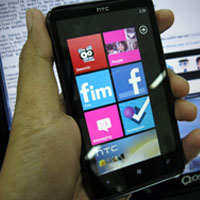
Seperti dikutip detikINET dari data Electric Forest, Jumat (31/12/2010), data dibawah ini merupakan urutan 10 ponsel WP7 dari berbagai vendor, dari ranking terkecil hingga terbesar di tiap kategorinya.
Perbandingan ketipisan ponsel (mulai paling tebal):
1. HTC 7 Pro
2. LG Optimus 7Q
3. Dell Venue Pro
4. HTC Surround
5. HTC HD7
6. HTC Mozart
7. HTC Trophy
8. LG Optimus 7
9. Samsung Omnia 7
10. Samsung Focus
Perbandingan berat ponsel:
1. Samsung Focus (115 gram)
2. HTC Mozart (130 gram)
3. Samsung Omnia 7 (139 gram)
4. HTC Trophy (140 gram)
5. LG Optimus 7 (157 gram)
6. HTC HD 7 (162 gram)
7. HTC Surround (165 gram)
8. HTC 7 Pro (185 gram)
9. LG Optimus 7Q (185 gram)
10. Dell Venue Pro (191 gram)
Perbandingan ROM/RAM:
1. Samsung Focus (1 GB) / HTC HD 7 (576 MB)
2. Samsung Omnia 7 (1 GB) / HTC Mozart (576 MB)
3. Dell Venue Pro (1 Gb) / HTC Trophy (576 MB)
4. HTC HD 7 (512 MB) / Samsung Focus (512 MB)
5. HTC 7 Pro (512 MB) / Samsung Omnia 7 (512 MB)
6. HTC Mozart (512 MB) / LG Optimus7 (512 MB)
7. LG Optimus 7 (512 MB) / LG Optimus 7Q (512 MB)
8. LG Optimus 7 Q (512 MB) / Dell Venue Pro (512 MB)
9. HTC Surround (512 MB) / HTC 7 Pro (448 MB)
10. HTC Trophy (512 MB) / HTC Surround (448 MB)
Perbandingan Ukuran Layar:
1. 4,3 inch - HTC HD7 dengan TFT-LCD
2. 4,1 inch - Dell Venue Pro dengan AMOLED
3. 4,0 inch - Samsung Omnia 7 dengan S-AMOLED
4. 4,0 inch - Samsung Focus dengan S-AMOLED
5. 3,8 inch - LG Optimus 7 dengan TFT-LCD
6. 3,8 inch - HTC Trophy dengan SLCD
7. 3,8 inch - HTC Surround dengan SLCD
8. 3,7 inch - HTC Mozart dengan SLCD
9. 3,6 inch - HTC 7 Pro dengan TFT-LCD
10. 3,5 inch - LG Optimus 7 Q dengan TFT LCD
Perbandingan ketahanan baterai (posisi standby):
1. HTC Surround (275 jam)
2. Samsung Focus (300 jam)
3. HTC HD 7 (310 jam)
4. Dell Venue Pro (336 jam)
5. HTC 7 Pro (360 jam)
6. HTC Mozart (360 jam)
7. HTC Trophy (360 jam)
8. Samsung Omnia 7 (390 jam)
9. LG Optimus 7 (416 jam)
10. LG Optimus 7Q (466 jam)
makin gila bersaing sepertinya ponsel-ponsel di pasaran demi kemudahan berkomunikasi dan kemudahan berinternet. sepertinya, blackberry juga akan tetap mengembangkan teknologi yang lebih canggih dan mutahir di 2011 ini.
Subscribe to:
Posts (Atom)
Featured post
Pemimpin Tanggung
Banyak dari kegitan saya yang terlibat dengan banyak ornag dan saya harus berinteraksi dengan pemimpin-pemiimpin pada kegiatan saya sehari-h...

-
 Banyak dari kegitan saya yang terlibat dengan banyak ornag dan saya harus berinteraksi dengan pemimpin-pemiimpin pada kegiatan saya sehari-h...
 -
 Kerja dari rumah ( Work From Home ) atau remote working emang punya banyak plusnya. Bisa kerja pakai celana pendek, gak perlu macet-macetan...